
Google Chrome 19 Is Out - Features Built-In Tab Syncing

Google Chrome team has just recently announced the availability of the newer and latest version of their popular browser, Google Chrome.  A couple of additions & upgrades have been made to Chrome 19. It includes a feature, usually called as Tab syncing. Head over to the video below to see what Tab syncing is all about. Google has also explained the feature & upgrades pretty well in their official blog post.


Say you’ve found an awesome recipe on your work computer, while... ahem... working hard at the office. But when you get back home, you can’t quite remember, if it was two teaspoons of baking soda or two teaspoons of baking powder. Wouldn’t it be cool if you could pull up the same recipe on your home computer with one click? With this new stable release of Chrome, it’s possible.

When you’re signed in to Chrome, your open tabs are synced across all your devices, so you can quickly access them from the “Other devices” menu on the New Tab page. If you’ve got Chrome for Android Beta, you can open the same recipe tab right on your phone when you run out to the store for more ingredients. The back and forward buttons will even work, so you can pick up browsing right where you left off.
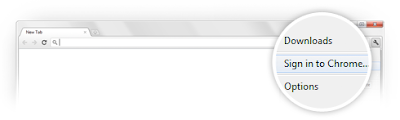


Open tabs aren’t the only things that sync when you sign in to Chrome. Signing in to Chrome also syncs your bookmarks, apps, extensions, history, themes, and other settings. That way, when you sign in to Chrome, you can have your personal Chrome experience on all your devices. Just go to the Chrome menu and select “Sign in to Chrome.”

While Chrome will be updated to the latest Stable version over the next few days, the tab sync feature will be rolled out more gradually over the coming weeks. That’s a pretty cool feature to have as all your data is now synced together on multiple devices. As mentioned earlier, the browsing history will work as well, so you won’t have to face the ugly ‘No connection error’. Download the latest stable version, Google Chrome 19 from Official website.


Comments

Popular posts from this blog

Webcam Toy: Digital Effects & Filters To Use With Webcam

Using webcam is always fun but using it with some cool effects is more entertaining, isn't it? 'Webcam Toy' extension for chrome allows users to explore 60 fun digital effects and filters to use with their webcam. You can play with loads of fun camera effects and filters, take photos, download to save on your computer or post them straight to Twitter and Facebook. How to use Webcam Toy? First, you need to allow access to your web camera when prompted. After that, choose your webcam from the list available. Then, choose a type of effect from the menu in the lower half of the screen by pressing the left or right arrows. Finally, take a picture by pressing the camera button, then choose to download or share.          Keyboard shortcut keys in the App: Arrow keys - Go to previous/next effect. 'G' - Show the Grid view, where you can see 9 effects at once. 'I' - Show the Info (settings) menu. 'S' - Square the photo (good for avatar/p...

Beta Updated to 23.0.1271.94 for Chrome OS

The Beta channel has been updated to 23.0.1271.94 (Platform version 2913.224.0) for all Chrome OS devices. This build contains a number of stability fixes. Release highlights: Pepper Flash updated to release 11.3.31.519 ARM Network stability changes If you find new issues, please let them know by visiting their Chrome build developers  help site or filing a bug . If you are interested in switching channels, then just follow  Find out how. You can even submit your feedback feedback using ‘Report an issue...’ in the Chrome menu (3 horizontal bars in the upper right corner of the browser). Update has been posted by - Josafat Garcia and Ben Henry, Google Chrome Source: [ Google Chrome Releases ]

Lets get inside the overview of Android

Android is a software stack for portable devices such as mobiles and tablets. The Android operating system is based on modified Linux kernel. The Android developer community extends the functionality of the devices beyond the stock applications. Currently more than hundred thousand Android apps are available in the Google Play Store. Coding for these applications is mainly done in Java using Google-developed Java libraries. The Android platform is coded in C for its core, C++ for third party libraries, and Java for the user interface. Most of the coding is stable under the Apache license as free and open source software. The recent stable release for the Android operating system is an Android 4.1 Jelly Bean, for Smartphones and Tablets. It supports ARM, MIPS, and Power and x86 platforms. Android's open source stack runs on a Java-based, object oriented application framework. It can be operate on the Java core libraries running on the Dalvik Virtual Machine (VM). Prior to ...